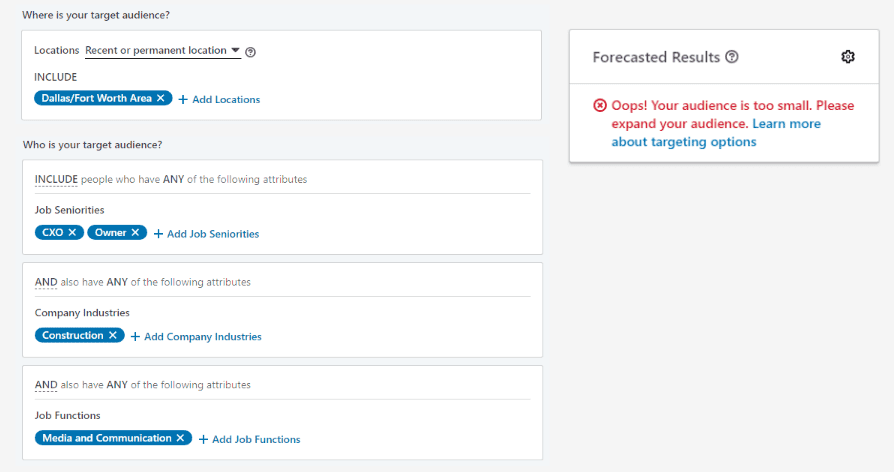
You’ve run a few campaigns, but you want to know some ways to make your campaigns even more successful in order to generate more LinkedIn leads. Considering different audience targeting techniques could be a significant first step toward ensuring your LinkedIn campaigns deliver to the right people at the right time. Read on to discover 5 Linkedin targeting tips you may not have considered.
Let’s start with audience sizes. Say you are building a campaign to reach people in several different industries. Rather than bunching all of those industries together in a single ad, have you considered creating a separate ad per industry? LinkedIn advises against lumping multiple personas into the same audience because your resulting ad may be too general to resonate with the overly-broad audience.
On the flipside, LinkedIn also recommends avoiding hyper-targeting by limiting your targeting to one or two additional options in addition to location. Audiences below 1000 users won’t deliver, and audiences slightly above 1000 users will have difficulty spending.
LinkedIn offers the option to choose Audience Expansion for any audience created using its targeting parameters. The LinkedIn Audience Expansion feature functions like a lookalike audience for your created saved audience. It will include additional people outside of your chosen targeting options in your ad delivery that have similar attributes as your selected audience. With Audience Expansion turned on, an ad including the human resources field would also deliver the ad to someone with the skill of recruiting listed on their profile.
However, you may already know about Audience Expansion and what it can do. But did you know you can exclude additional parameters from the audience expansion?
Say you want to ensure that your ad isn’t delivered to a competitor. Or maybe you don’t want to target anyone with the seniority level of entry level. If you add those options as exclusions to your LinkedIn audience, Audience Expansion will honor those exclusions.
LinkedIn recently introduced Lookalike Audiences to its ad platform. You can now create lookalike audiences with a matched audience serving as the audience seed. LinkedIn has reported their beta users saw their audience reach increase five to ten times the original audience size using this feature. So, like its Facebook cousin, LinkedIn Lookalike Audiences could prove to be a powerful tool for reaching LinkedIn members similar to your existing customer base or users in your retargeting pool.
Matched audiences allow marketers to target a specific set of people or companies with LinkedIn ads. There are two ways to build a matched audience in LinkedIn:
For uploaded lists, allow 48-72 hours for the audience to build. Matched Audiences must reach a threshold of 300 matched users before they can be used in an advertising campaign.
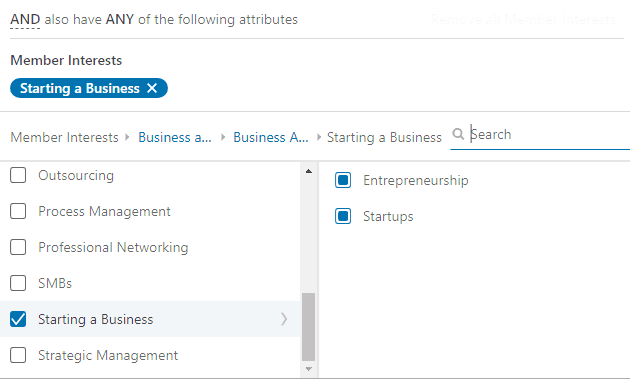
Did you know you can include interests in your LinkedIn campaign targeting? While the targeting options for LinkedIn Interest Targeting are not as robust as Facebook’s nearly limitless library of interest parameters, LinkedIn’s version of interest targeting offers quite a bit.
With LinkedIn Interest Targeting, you can choose to target by a broad interest category like Business and Management or drill down further into categories like company acquisitions, human resources, or starting a business.
LinkedIn bases their interest targeting off of their users’ Bing searches and their interaction with various posts and accounts on LinkedIn. Because this feature is still relatively new, we suggest testing it out on a few of your campaigns before diving head first into LinkedIn Interest Targeting. More on campaign and ad testing in tip #5.
You may already be setting up your LinkedIn ads to target by age, and you’d think that would be the obvious best way to reach people in a certain age demographic. However, LinkedIn calculates age based on a user’s first included graduation date. Since not everyone includes graduation dates in their profiles, targeting by age may severely limit your potential audience size.
As an alternative, LinkedIn recommends choosing years of experience instead. LinkedIn calculates years of experience by adding up the duration of each individual’s job experience entries. LinkedIn does not double-count overlapping entries or count gaps in experience. Choosing years of experience as a targeting option does not cause the same limiting factor as age. However, we have noticed a higher suggested bid with the years of experience targeting option than with age.
Pairing different targeting options with years of experience can create highly-desired audiences. As an example, pair years of experience with a seniority level of senior or higher to reach experienced professionals with influence over the buying decision, aka decision makers.
While we are sure you are anxious to start implementing some of these LinkedIn targeting strategies for yourself, it’s essential to test them out first. Not every tactic is going to be the perfect fit for every account. Carefully testing will illuminate what works best for your brand and, over time, will net you the biggest possible bang for your advertising buck.
LinkedIn’s ad platform lets you test in various ways.
You can also take advantage of LinkedIn’s Demographics Reporting features.
Once you have used a matched audience, like a CRM audience or audience generated by the LinkedIn Insight Tag, LinkedIn will activate Website Demographics for that audience. Note that, for privacy reasons, LinkedIn will not turn on this feature until the ad delivers to 300 users or more.
With Website Demographics, you can rank various targeting options like job function, industry, and even company by percent of total page views or percent change for a set time period to see who engaged most and least with your ad.
For example, here is Vende Digital’s data for April. You can see that users with a seniority level of senior engaged more than those with a seniority level of CXO, entry, or owner.
Website Demographics can be especially useful if you want to limit ad dollar waste with an audience that doesn't deliver to demographics who typically don’t engage with your brand’s ads. Alternatively, it could also give you ideas of how you could split a broad audience into smaller, more specific audiences. You can even compare matched audiences to see if a retargeting user interacts at a higher rate than your CRM audience.
Do you need help developing a successful LinkedIn advertising strategy? We offer strategic planning, social media advertising, social selling training, and sales enablement tools that can help you win this year. If you are interested in learning more, sign up for a complimentary initial consultation/discovery meeting. Schedule yours today and let’s see if we can help.